LATEST VERSION
Description
On this page

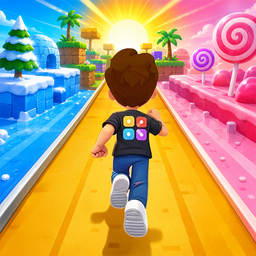
Kooply Run™: Play and Create! APK stands out in arcade gaming by combining endless running with a built-in level editor shaped by its community. Each session can shift from chasing scores in fast obstacle courses to building original layouts and sharing them with other players. With themed worlds, daily rankings, and creator tools, it offers more than a standard runner.
Introduce About Kooply Run™: Play and Create!
Developed by KOOPLY, this arcade title centers on two connected ideas: fast runs and player-made stages. Kooply Run™: Play and Create! APK gives players a chance to race through obstacle-filled courses, then switch roles and design their own levels using an in-app editor packed with building pieces.
The game draws much of its appeal from community activity. Players can browse a huge range of user creations, publish their own designs, and watch likes, scores, and follower counts grow. Kooply Run™: Play and Create! APK also keeps competition active with daily leaderboards and a featured Level of the Day that highlights standout stages.
Explore the Exciting Gameplay
At its core, the game is about quick reactions and constant movement. Runs ask players to jump, dash, slide, and dodge through changing layouts while aiming to stay alive longer and score higher. Kooply Run™: Play and Create! APK adds variety by letting the community shape a large share of the content available to play.
- Endless runner action: Runs focus on timing and reflexes as obstacles appear across multiple lanes and shifting paths.
- Built-in level creator: The editor allows players to build custom maps with loops, stacked floors, and different route designs.
- Community sharing: Finished levels can be published for other players to try, rate, and compete on.
- Themed environments: Settings such as Subway, Candyland, Enchanted Forest, and Western change the visual style of each run.
- Competitive goals: Daily leaderboards and the Level of the Day give players fresh targets and a reason to return.
- Power-ups and upgrades: Extra boosts can help save a run or support better scores during difficult sections.
Because both playing and creating are central, Kooply Run™: Play and Create! APK supports short sessions and longer creative stretches equally well. One moment may be spent testing a demanding obstacle sequence, while the next focuses on refining a custom stage for the community.
Key Features of Kooply Run™: Play and Create! APK
Kooply Run™: Play and Create! APK brings together responsive arcade action and a creator-focused social loop. Its feature set is built around expression, replay value, and regular competition, which helps the game maintain momentum across both solo runs and shared content.
1. Endless running shaped by quick reflexes
The running side of the game depends on precise movement and fast decision-making. Players need to react to obstacles by switching lanes and using jumps, slides, or dashes at the right time. This structure keeps each attempt lively, especially when chasing a better score in Kooply Run™: Play and Create! APK.
- Run through obstacle-heavy courses
- Use jump, dash, slide, and dodge actions
- Aim for longer streaks and stronger scores
2. In-app editor for custom level creation
A major feature is the editor, which supports free-form stage building with many pieces and layouts. Players can create short challenges or extended gauntlets, then test them before sharing. Kooply Run™: Play and Create! APK gives creators room to experiment with route structure and difficulty.
- Build with hundreds of elements
- Create loops, multiple lanes, and stacked floors
- Design both short and long courses
3. Community-made levels and creator visibility
The game is strongly driven by user content. Millions of community levels can be explored, and publishing a new map opens the door to likes, scores, and followers. That social layer gives Kooply Run™: Play and Create! APK a steady flow of fresh stages while rewarding active creators with visible feedback.
- Browse a large collection of player-built levels
- Share your own maps with the community
- Track likes, scores, and follower growth
4. Themed worlds and avatar customization
Visual variety plays a big role in keeping runs distinct. Themes such as Subway, Candyland, Enchanted Forest, and Western give stages different moods, while avatar customization lets players shape a character look that matches their preferences. Kooply Run™: Play and Create! APK uses these options to add personality to both play and creation.
- Subway theme
- Candyland theme
- Enchanted Forest theme
- Western theme
- Customizable avatar appearance
5. Daily competition and helpful power-ups
Leaderboards and recurring featured content give every run a purpose. Daily challenges, the Level of the Day, and worldwide rankings encourage repeat play, while upgrades and power-ups can help in difficult moments. Kooply Run™: Play and Create! APK balances score chasing with tools that support stronger performances.
- Daily Level of the Day
- Worldwide leaderboards
- Daily challenges
- Collectible upgrades and power-ups
Graphics and Sound Experience
The game presents its action with vivid HD visuals that help each theme stand apart. Bright environments and readable obstacle design support the fast pace, while the overall presentation reinforces the arcade tone. Kooply Run™: Play and Create! APK puts emphasis on clear movement feedback and colorful style during both play and level testing.
- Vivid HD graphics support the arcade atmosphere
- Different world themes create distinct visual moods
- Responsive controls help movement stay readable
- Obstacle layouts remain easy to track during fast runs
How to Download and Install Kooply Run™: Play and Create!
Follow these steps to get Kooply Run™: Play and Create! APK on your Android device.
- Visit the category on APKCombo to find this title, or open Google Play if you prefer the official store listing.
- Choose a compatible release for your device, confirm that it matches your Android setup.
- Start the download and wait for the APK or XAPK file to finish, which may take more or less time depending on your connection and device performance.
- Open the downloaded file from your device storage and follow the installation prompts that appear on screen.
- Launch the app after installation, allow any brief resource setup to complete, and then start playing or creating levels.