
LATEST VERSION
Description
On this page

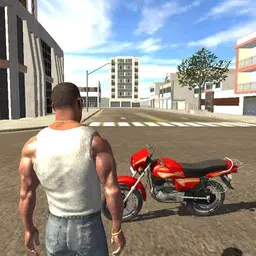
Los Angeles Crimes APK is an action sandbox built around open-ended play, realistic physics, and flexible multiplayer. It combines shooting, driving, custom maps, and social tools in one mobile package. With first- and third-person camera options, community-made content, and detailed performance settings, the game gives players room to experiment across free roam sessions, competitive matches, and creative building.
Introduce About Los Angeles Crimes
Developed by Mohammad Alizadeh, Los Angeles Crimes belongs to the Action category and focuses on a broad sandbox structure instead of a single scripted path. Los Angeles Crimes APK stands out through active ragdolls, natural-looking collisions, and the option to swap between first-person and third-person perspectives depending on the mode or situation.
The game supports free roam, team deathmatch, zombie survival, car races, and soccer, while also giving players tools to create their own maps through the LSC Editor. Los Angeles Crimes APK also includes LAN and online multiplayer, adjustable room sizes, and access to a community Maps Archive that keeps sessions varied beyond the default setup.
Explore the Exciting Gameplay
Los Angeles Crimes APK mixes physics-driven action with several ways to play, so sessions can shift from relaxed experimentation to fast competitive rounds. The sandbox structure encourages testing vehicles, movement, and custom spaces, while multiplayer support adds a social layer for both small groups and larger rooms.
- Play Modes: Choose from free roam, team deathmatch, zombie survival, car race, and soccer.
- Camera Options: Switch between first-person and third-person views to suit aiming, driving, or map awareness.
- Physics System: Active ragdolls and realistic reactions shape stunts, crashes, falls, and firefights.
- Map Creation: Use the LSC Editor to build layouts, change routes, and save custom ideas in-app.
- Community Content: Browse the Maps Archive for user-made creations and inspiration.
- Multiplayer Access: Join LAN or online sessions with quick Connect and host-defined player limits.
That variety helps Los Angeles Crimes APK stay interesting over time. One match may focus on shooting and movement, while the next leans into racing lines, vehicle handling, or testing a freshly edited map with friends on a local network.
Key Features of Los Angeles Crimes APK
At its core, Los Angeles Crimes APK is built around freedom, social play, and extensive customization. Its strongest features support both casual experimentation and organized matches, while the editor and graphics settings add depth for players who want more control.
1. Multiple game modes in one sandbox
The game offers five distinct ways to play, giving each session a different pace and purpose. Free roam is ideal for testing jumps, vehicles, and ragdoll interactions, while the combat and survival modes emphasize quick reactions. Racing and soccer highlight movement and object physics in a more playful format.
- Free Roam: Open-ended exploration and experimentation.
- Team Deathmatch: Competitive shooting with team-based action.
- Zombie Survival: Pressure-focused encounters with fast decision-making.
- Car Race: Vehicle handling and route testing.
- Soccer: Ball physics and vehicle-based control.
2. Realistic physics with active ragdolls
Physics play a major part in how Los Angeles Crimes APK looks and behaves from moment to moment. Collisions, falls, and stunt attempts react in a more natural way, which gives movement and combat a lively edge. The active ragdoll system also adds humor and unpredictability during chaotic matches or free roam experiments.
3. First-person and third-person camera switching
The ability to change perspective makes the game more adaptable. First-person view can help with direct aiming, while third-person view gives broader awareness during driving, movement, or crowded situations. This flexibility is useful across different modes, especially when shifting between combat-focused and vehicle-focused activities.
4. LSC Editor and community Maps Archive
Los Angeles Crimes APK goes beyond built-in content by letting players create and refine maps. The LSC Editor includes tools for shaping spaces, adjusting layouts, and saving data inside the app. For players who prefer to start from existing ideas, the Maps Archive provides a large collection of community-made maps to test and adapt.
- Layout Editing: Rearrange areas and make practical changes.
- Save Tools: Store map data directly from the in-app menu.
- Community Archive: Access many user creations for inspiration.
5. LAN, online multiplayer, and social tools
Multiplayer in Los Angeles Crimes APK supports both local and internet play, making it easy to host private sessions or join broader rooms. Hosts can choose player limits before starting, and the Connect option speeds up entry. The in-world phone adds chat, emoji, emotes, a camera app with zoom, and mic controls for lighter social interaction during matches.
Graphics and Sound Experience
Los Angeles Crimes APK includes an extensive set of graphics controls, letting players tune image quality and performance around their device. Adjustable options cover resolution, render distance, shadows, lighting, water, anti-aliasing, bloom, ambient occlusion, dynamic shadows, tone mapping, and the FPS cap, which can reach 120 on supported hardware.
- Performance Tuning: Lower render distance or shadow quality when frames drop.
- Visual Options: Control lighting, water, bloom, and other effects individually.
- Frame Rate Cap: Up to 120 FPS on capable devices.
- Population Slider: Adjust in-world crowd density for stability.
- Comfort Settings: Sensitivity and camera sharpness can be changed for better control.
How to Download and Install Los Angeles Crimes
Follow these steps to get Los Angeles Crimes APK on your Android device.
- Visit the category on APKCombo to browse releases, or check Google Play for the official store listing.
- Choose a compatible version of Los Angeles Crimes APK that matches your device and Android setup.
- Wait for the APK or XAPK file to finish downloading, making sure you have enough storage available.
- Open the downloaded file and follow the installation prompts shown on your device.
- Launch the game, select your language, choose a character, enter a player name, and start playing.