LATEST VERSION
Description
On this page
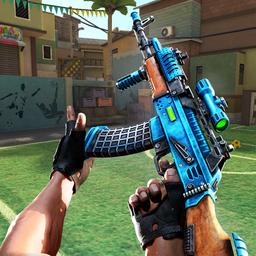
MaskGun: FPS Shooting Gun Game APK brings a mobile-focused online shooter built around quick real-time PVP matches, short sessions, and social play. It combines accessible controls, automatic firing assistance, varied maps, and multiple competitive modes. With private 1v1 rooms, voice chat, and a large weapon selection, MaskGun: FPS Shooting Gun Game APK is designed for players who want fast action without a long learning curve.
Introduce About MaskGun: FPS Shooting Gun Game
Developed by SuperGaming, MaskGun: FPS Shooting Gun Game is an Action title made for mobile devices. The game centers on online first-person shooting, with controls tailored for phones and tablets so movement and aiming are easy to pick up. Its design supports quick entry into matches, helping new players start competing without much setup.
MaskGun: FPS Shooting Gun Game APK focuses on real-time PVP battles that can fit into short breaks or longer sessions. Players can join friends, build squads, enter public matches, or arrange private face-offs. Alongside shooting modes, it includes character styling, armor, masks, missions, achievements, clans, and recurring content updates that keep the experience active.
Explore the Exciting Gameplay
MaskGun: FPS Shooting Gun Game APK is built around brisk multiplayer rounds, clear objectives, and easy-to-understand controls. The pacing stays quick, while the range of maps and weapons gives each match a different rhythm. Public and private options also make it suitable for both casual competition and more focused duels with friends.
- Real-time PVP: Fight other players online in live first-person shooter matches.
- Mobile-friendly controls: The control scheme is designed for touch devices, with auto-shooting support to help players get started faster.
- Multiple modes: Team Deathmatch, Rumble, and Control Point offer different goals and match styles.
- Private 1v1 matches: Set up personal standoffs that include voice chat and spectator support.
- Broad arsenal: Choose from more than 40 firearms across several weapon classes.
- Social systems: Invite friends, join clans, and play in squads across short sessions.
The result is a shooter that keeps downtime low and action frequent. MaskGun: FPS Shooting Gun Game APK suits players who prefer matches that start quickly, run smoothly on mobile, and leave room for teamwork, rivalry, and customization.
Key Features of MaskGun: FPS Shooting Gun Game APK
MaskGun: FPS Shooting Gun Game APK combines approachable play with competitive features. Its structure supports quick matchmaking, recognizable mode variety, and steady personalization, while still keeping the core focus on direct online shooting.
1. Fast online FPS matches for mobile
The game is structured for real-time online competition with short rounds and responsive pacing. Because it is built specifically for mobile hardware, aiming and movement are adapted to handheld play. This makes MaskGun: FPS Shooting Gun Game APK a practical choice for players who want a shooter that starts quickly and stays readable during intense fights.
2. Easy controls with auto-shooting support
One of the most approachable parts of the game is its simple control system. Helpful auto-shooting reduces the barrier for beginners, allowing players to focus on positioning and map awareness earlier. At the same time, faster decision-making still matters, so matches retain a competitive edge as players improve.
3. Large weapon selection
MaskGun: FPS Shooting Gun Game APK includes more than 40 modern guns, giving players several combat styles to explore. The weapon pool supports close-range pressure, balanced mid-range fights, and long-distance picks depending on the map and mode.
- Snipers: For long sightlines and precise eliminations.
- Shotguns: Built for close encounters and aggressive pushes.
- SMGs: Useful for mobility and quick engagements.
- Pistols: A lighter sidearm option for flexible play.
- Assault rifles: A steady choice across many situations.
4. Maps and modes that keep matches varied
The game offers nine maps and three core competitive modes, which helps maintain variety across repeat sessions. Different environments and objectives shift how players move, defend, and attack, giving each round a distinct flow in MaskGun: FPS Shooting Gun Game APK.
- Maps: Yard, Ryokan, Downtown, Airport, Courtyard, Mayan, Blizzard, Favela, Lighthouse.
- Modes: Team Deathmatch, Rumble, Control Point.
5. Social play, customization, and progression
Beyond standard matchmaking, the game supports private 1v1 standoffs with voice chat and spectator options. It also includes masks, armor, custom characters, missions, achievements, friends, and clans. These systems give MaskGun: FPS Shooting Gun Game APK more than one reason to return, especially for players who like social competition and visual customization.
Graphics and Sound Experience
MaskGun: FPS Shooting Gun Game APK uses map variety and modern weapon styling to keep matches visually distinct. The different locations, from urban spaces to colder outdoor arenas, give battles a changing backdrop. Audio matters most in its social and combat features, especially when private 1v1 rooms use voice chat for direct communication.
- Diverse arenas help matches avoid a repetitive visual pattern.
- Modern gun categories support recognizable combat roles.
- Improved lighting in version 4.00 refines presentation on several maps.
- Voice chat adds a direct communication layer to private duels.
How to Download and Install MaskGun: FPS Shooting Gun Game
Follow these steps to get MaskGun: FPS Shooting Gun Game APK on your Android device.
- Visit the category on APKCombo to browse this title, or open Google Play for the official store listing.
- Choose a compatible release of MaskGun: FPS Shooting Gun Game APK for your device, checking the listed version and package name: com.junesoftware.maskgun.
- Wait for the APK or XAPK file to finish downloading completely, which may take longer on slower networks.
- Open the downloaded file and allow installation permission on Android if the device asks for it.
- Launch the game after installation, sign in if needed, and start a match or set up a private 1v1 room.