PHIÊN BẢN MỚI NHẤT
Mô tả
On this page
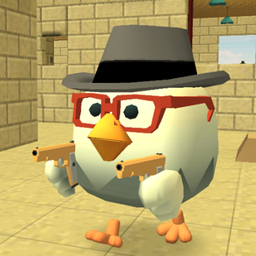
Chicken Gun APK is a stylized online action game built around armed chickens, fast matchmaking, and short multiplayer rounds. It mixes 5v5 team battles with free-for-all chaos, then adds explosive eggs, funny cosmetics, and a steady coin-based progression system. The result is a competitive mobile shooter that stays light in tone while still giving players room to refine weapons, tactics, and personal style.
Introduce About Chicken Gun
Developed by ChaloApps, Chicken Gun is an Action title for Android that also supports play on PC through Google Play Games on PC. The game centers on online multiplayer fights where quick reactions, map awareness, and timing matter as much as your chosen gear.
Chicken Gun APK stands out through its comic presentation and brisk pacing. Matches are designed to start quickly, and players can choose between squad-based combat or a mode where every opponent is fair game. Alongside combat, the game gives plenty of attention to cosmetic variety, weapon skins, and account-based progress across devices.
Explore the Exciting Gameplay
At its core, Chicken Gun APK focuses on short rounds, lively firefights, and a playful combat system that never takes itself too seriously. You enter online rooms through a server browser, select a region and map, and jump into matches where explosives, firearms, and occasional vehicles shape the pace.
- Two online modes: Team Fight supports 5v5 matches, while Against All throws everyone into a free-for-all format.
- Explosive egg attack: A signature secondary attack deals area damage and can scatter groups or break defensive positions.
- Weapon variety: Different firearms support accurate play, sustained spraying, or close-range aggression.
- Server selection: Region and map choices help players find lower ping and the style of match they prefer.
- Vehicles on select maps: Some arenas include drivable options for repositioning, chasing enemies, or adding cover during fights.
- Vote-kick support: Multiplayer rooms include a system to remove disruptive players when enough participants agree.
Chicken Gun APK rewards players who adapt to each map and mode. Team Fight often depends on timing and cooperation, while Against All favors awareness and quick decision-making. After a few matches and some control adjustments, the flow becomes easier to read and much more enjoyable.
Key Features of Chicken Gun APK
Chicken Gun APK combines arcade shooting with humorous design choices and flexible customization. Its main features all support repeated online play, from the two-match structure to cosmetics, progression, and map variety.
1. Fast online multiplayer modes
The game keeps its structure simple with two main playlists. Team Fight places two groups of five against each other, while Against All removes alliances and turns every encounter into a direct threat. Both modes are built for quick entry and short sessions.
- Team Fight: 5v5 matches with squad coordination and pressure around chokepoints.
- Against All: A free-for-all setup focused on reactions, positioning, and constant movement.
2. Signature explosive eggs
The explosive egg is the mechanic that gives Chicken Gun APK much of its personality. Used as a secondary attack, it deals area damage and can punish grouped enemies. It also changes spacing in firefights, because opponents must keep moving or risk taking damage from a well-timed throw.
3. Deep rooster customization
Visual customization is one of the strongest parts of the game. Players can shape how their rooster looks with multiple cosmetic elements, and saved presets make it easier to switch between styles before entering a match.
- Beaks: Adjust the character’s facial style.
- Sneakers: Add a different visual tone to your rooster.
- Caps: Change the overall look with headwear options.
- Weapon skins: Personalize your gear without changing the game’s core structure.
4. Maps, weapons, and vehicles
Chicken Gun APK keeps matches from becoming repetitive by rotating players through different environments and combat rhythms. Some maps are compact and intense, while others allow more open movement. Vehicles appear on certain maps and can change positioning, pursuit, and cover during combat.
5. Coin economy and account progress
Coins are used to obtain items and gear, and they can be earned during play or received through ads and in-app purchases. Progress remains tied to your account, which is useful for players who split time between Android and PC. This helps long-term play feel connected even when switching devices.
Graphics and Sound Experience
Chicken Gun APK uses a bright, cartoon-like visual style that matches its absurd premise. Armed chickens, exaggerated cosmetics, and explosive effects create a playful mood, while the combat still stays readable enough for quick online matches. The presentation supports both funny moments and competitive action without losing clarity.
- Stylized visuals: Cartoon art direction fits the game’s comic concept.
- Readable effects: Explosions and attacks are easy to notice during crowded fights.
- Distinct cosmetics: Beaks, caps, sneakers, and skins help characters stand apart.
- Energetic battle atmosphere: The game’s audio and action work together to keep rounds lively.
How to Download and Install Chicken Gun
Follow these steps to get started with Chicken Gun APK on your Android device.
- Visit the category on APKCombo to browse this title, or use Google Play if you prefer the official store listing.
- Choose a compatible release for your device, and confirm that your phone has enough storage before downloading Chicken Gun APK.
- Wait for the APK or XAPK file to finish downloading over a stable connection, since file size and speed can vary by version and network.
- Open the downloaded file from your device storage, then allow installation from APK sources if your Android system requests permission.
- Launch Chicken Gun APK after installation, let the game download any extra data, and sign in so your progress can sync across supported devices.